A lesson presentation with AI: from idea to slides in ten minutes
A deck that teaches has few words: one idea per slide, a question for the whole class every three or four slides, and a worked example before every practice. Ask the tool for the outline first, then the slides, and check five things before you present: facts, level, language, images and sources.
Before you present: checking a deck an AI tool wrote
A free printable PDF, no sign-up.
- Definition
- Lesson presentation: Slides a teacher shows during a lesson to carry what is hard to say in words alone: a picture, a worked example, or a question the whole class answers. It is not the teacher's explanation typed onto a screen.
Ask an AI tool for a deck on your lesson without saying what shape it should take, and you may get something that looks like a lecture: a heading with six bullet points under it. That deck does not teach. This post gives the four rules that make a deck teach, the prompt that asks the tool for them, a full outline for one lesson, and what to check before you present.
Four rules that make a deck teach
“Cognitive load theory: Research that teachers really need to understand”, published by the Centre for Education Statistics and Evaluation at the New South Wales Department of Education in September 2017, explains that working memory is limited, and that research suggests an average person can hold only about four chunks of information in it at one time. One of its examples of the “redundancy effect” is a PowerPoint presentation in which the presenter reads the text on the screen. The same information arrives in two forms, which overloads working memory and gets in the way of learning.
The same paper describes the “worked example effect”: novice learners who study worked examples do better on later tests than learners asked to solve the equivalent problems themselves. The exception is learners who have gained expertise; for them, worked examples help less and less. In “Principles of Instruction” (Spring 2012), Barak Rosenshine adds two more: present new material in small steps with student practice after each step, and ask a large number of questions and check the responses of all students. He cites a study in which the least effective teachers asked only nine questions in a 40-minute period. From all of this come four rules:
| Rule | Why | What it looks like on the slide |
|---|---|---|
| One idea per slide | Working memory holds very little, and new material goes in small steps | One short sentence and one picture or diagram. We suggest no more than 15 words of text |
| A question for the whole class every three or four slides | Many questions, and checking every student's answer, not only the raised hands | A slide with the question alone, which every student answers on a mini whiteboard or a slip of paper |
| A worked example, then practice | The worked example effect — and fewer examples as students gain expertise | The working in numbered steps that appear one at a time, then a similar problem left unsolved |
| Few words; the explanation is your voice | Reading the on-screen text aloud is redundancy that overloads working memory | Key words on the slide, the explanation in the speaker notes, and labels on the diagram itself, not in a paragraph beside it |
Labels on the diagram itself is another finding from the same Australian paper, which calls it the “split attention effect”: when a diagram can only be understood by referring to separate text, the student has to hold both in working memory at once. The fix is to put the words where they belong on the diagram.
The prompt: copy it and fill in the brackets
Ask for the outline first and the slides second. You can check an outline in three minutes; with a designed deck, the colours distract you from the mistakes. Fill the square brackets with your own lesson. (The Arabic version of this post gives the same prompts in formal Arabic, for teachers who want the deck in Arabic.)
1. The outline: I need an outline for a presentation to use in a [45]-minute [maths] lesson for Grade [6] on [finding a percentage of a number]. The lesson goal: [students find a percentage of a number]. Students already know: [fractions with a denominator of 100]. Write an outline of [12] slides, with no design, following these rules: one idea per slide; a slide with a single question for the whole class after every three or four slides; a worked example in numbered steps, followed by a similar problem left unsolved; and no more than [15] words of text per slide. For each slide, give its type, its text as it will appear on screen, the suggested picture or diagram, and what the teacher says or asks.
2. The slides: Use the outline with these changes: [your changes]. Now write the text of each slide as it will appear on screen, and put the explanation in the speaker notes, not on the slide. On question slides, write the question alone, and put the answer and the mistake students are likely to make in the notes.
3. A first check: Review the deck and give the slide number with each answer: which slide has more than one idea? Which problem needs something students have not learned yet? Which fact needs a source? Which suggested picture would a student not understand without an explanation?
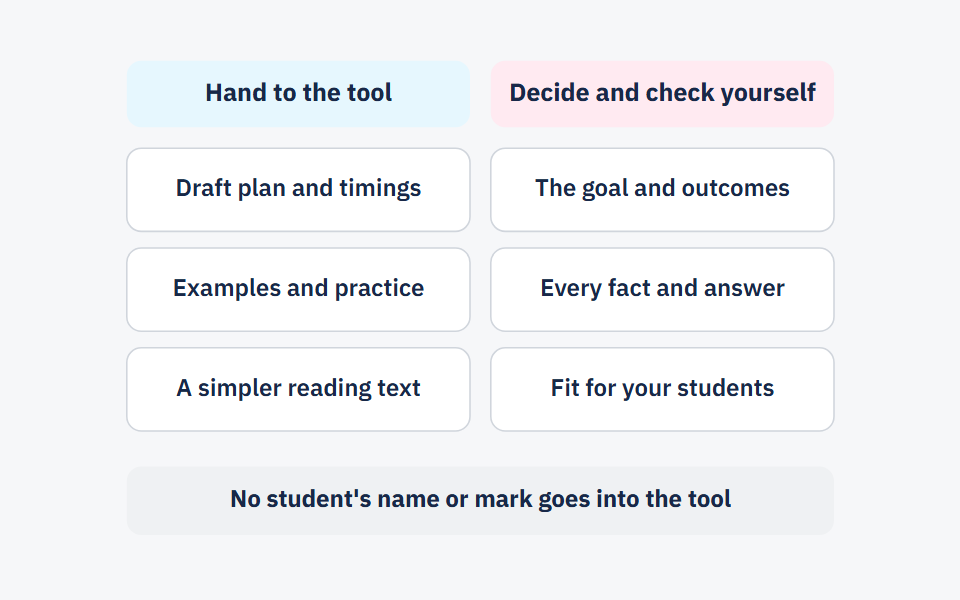
The third prompt speeds up your review; it does not replace it, because the tool that wrote a mistake may not see it. None of the three prompts needs a student's name. For the rest of your prep — the plan, the examples, two-level practice, the exit ticket — lesson prep with AI has six more prompts.
The ten minutes, step by step
These minutes are our estimate for a 10- to 12-slide deck on a lesson you know well, not a published measurement. The longest part is the review, and it is the last thing to cut.
Two minutes: write the goal and what students know
Take the goal from your curriculum's outcomes for the lesson and write it with a verb you can see: find, compare, draw. Then write one line on what students learned before today.
One minute: paste the first prompt
Fill in the blanks and ask for the outline only — no design, no images.
Three minutes: check the outline
Count the ideas on each slide and count the question slides. If four slides pass with no question, or one slide holds two ideas, write the change into the second prompt.
One minute: ask for the slides
The second prompt, with your changes. The explanation goes in the speaker notes, not on the screen.
Three minutes: check the slides
Solve every problem yourself, read every slide as a student in the back row would, then finish with the review checklist at the end of this post.
A full example: a 12-slide outline for a lesson on percentages
This outline was written for this post, not copied from a textbook. Students answer on six of the twelve slides, and never more than two slides go by without them answering. The two worked examples are solved here; the practice problems are left without answers.
| # | Slide type | On screen | What you say or ask |
|---|---|---|---|
| 1 | Title and goal | “Today: finding a percentage of a number” | Read the goal, and say there is a question at the end that every student answers alone |
| 2 | Review question | Write as a fraction in simplest form | Every student writes on a mini whiteboard, and everyone holds theirs up together |
| 3 | One idea | A grid of 100 squares with 25 shaded, and under it: “ means 25 out of every 100” | “How many squares are shaded? How many are in the whole grid?” |
| 4 | Worked example | of 80: | Think aloud, and reveal each step after you say it |
| 5 | Question for the class | What is of 70? | Look at every board before you go on |
| 6 | Second worked example | of 60: of 60 is 6, is half of that, 3, and the total is | “Why did we start with ?” |
| 7 | Guided practice | of 46, and of 35 | In pairs, while you walk round and ask anyone stuck about their first step |
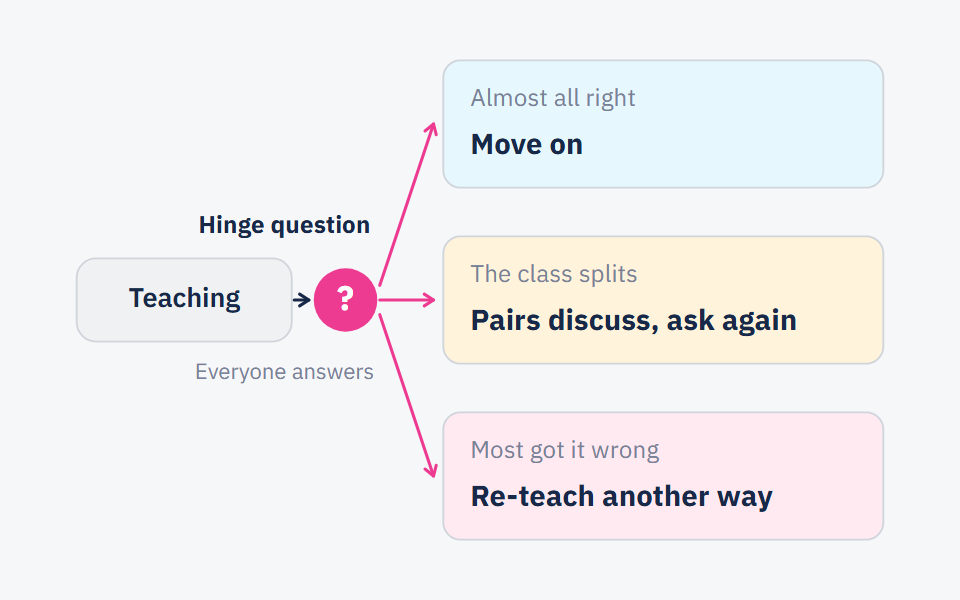
| 8 | Hinge question | Which is larger: of 50, or of 30, or are they equal? | Every student chooses and writes one line of reasoning; what you do next depends on the answers |
| 9 | Common mistake | A student wrote: “ of 80 is 55” | “What did he do?” He subtracted 25 from 80 () instead of finding of it, which is 20 |
| 10 | Independent practice | In a class of 40 students, of the students in the class walk to school. How many students walk to school? | Each student works alone for two minutes |
| 11 | Summary | “To find a percentage of a number: divide the percentage by 100, then multiply the result by the number” | Ask a student to say it in their own words before you reveal it |
| 12 | Exit ticket | Find of 120, and write your first step | On a slip each student hands in on the way out |
What the teacher does with slide 8: a hinge question is the one question after which you decide whether to move on or go back. If many students get it wrong, return to the grid on slide 3 before the independent practice. More in hinge questions. Sort the slips from slide 12 into three piles after the lesson, as in the exit-ticket guide.
Before you present: five things to check, then the four rules
Reviewing the deck
- Facts: I solved every problem myself, and checked every definition, date and number against the textbook or a reliable source.
- Level: No slide needs something students have not learned yet, and the problems build from the example to something slightly harder.
- Language: The language is correct, the terms are the ones in the students' textbook, and the numbers are written the way my class writes them.
- Images: Every picture explains something rather than decorating, any text inside a picture is correct and readable, and Arabic letters in it are joined and not reversed.
- Images: I know where every picture I did not draw comes from, and I am allowed to use it in class.
- Sources: I opened every source the deck cites and read that it says what is attributed to it, and I removed any source I could not open.
- The four rules: one idea per slide, a question for the class every three or four slides, a worked example before every practice, and the explanation in the notes, not on the screen.
When ten minutes is not enough
Ten minutes is not enough in three cases. First, a lesson you do not know well: checking every fact takes longer. Second, a lesson that rests on precise images — maps, the parts of a cell, geometric figures. Draw these or take them from the students' textbook, and do not accept the tool's version until you have checked every label in it. Third, asking for the whole deck in one prompt: correcting it takes longer than the outline and the slides would have taken.
If your classroom has no projector, the outline still works: write the question slides on the board where they fall in the lesson, and print the worked examples and practice problems on one sheet.
Frequently asked questions
- What is the best free AI presentation maker for teachers?
- There is no single best one for every teacher. Run the same prompt from this post in two tools and compare the quality of the language — including Arabic and right-to-left text if you need it — how easy it is to edit and print the slides, and what the privacy terms say about what you type.
- How many slides does a 45-minute lesson need?
- There is no published rule. We suggest 10 to 12 for a lesson with explanation and practice, because much of the lesson is students working on paper, not watching the screen.
- Should I ask the AI tool for images?
- Ask it to describe the right picture for each slide, then choose or draw the picture yourself. If you use an image the tool generated, check every word and label in it before you show it.
- How do I make an AI presentation in Arabic?
- Write the prompt in formal Arabic, ask for Arabic explicitly, and say which numerals you want. Then check the text direction, the spelling and the terms as the students' textbook writes them.
Sources
Every fact in this post that we did not produce ourselves comes from one of these sources.
- Cognitive load theory: Research that teachers really need to understand — Centre for Education Statistics and Evaluation (CESE), NSW Department of Education, 2017-09
- Principles of Instruction: Research-Based Strategies That All Teachers Should Know (Barak Rosenshine) — American Educator, 2012 (Spring issue)
Written with String's editorial team: we use AI for research and first drafts, and a person checks every fact and every source before anything is published. How we write
Founder and CEO, String
“I grew up in a house of teachers.” I spent a year designing the STEM program for one of the largest school groups in Saudi Arabia, have written curriculum by hand, trained robotics coaches and sold software into schools, then left that job to build String in Amman.