Exams
A paper in the real national-exam format, ready to print
Questions, figures, header and marks — on A4 exactly as your student will see them.
By the numbers
169
interactive figures, inside the paper
23
question types
7
ways to answer on a figure
4
forms of one paper
A paper your head of department signs off unchanged
Nothing on the page tells a reader it was generated.
In the format your student knows
Numbered questions, parts a, b and c under one of them, a mark beside each part, a passage to read before a group. It reads as an exam paper because it is one.
Marks go to the working
A three-mark question is rarely three marks for the final number. Write the scheme in the letters you already use: M for method, A for the answer, B for an independent mark. A student who sets the integral up correctly and slips on the arithmetic keeps the method mark.
It prints exactly as you see it
The document is a real A4 page at 210 by 297 millimetres, paginated by measuring every question. You place the page breaks yourself, and staple up to 4 blank pages on the back for rough work.
The masthead your school prints
School name and crest, subject, grade, section, date, the student's name, the teacher's name, the total. You edit them by clicking them on the paper itself, and any field your school does not print is switched off and gone.
Your student answers on the figure itself
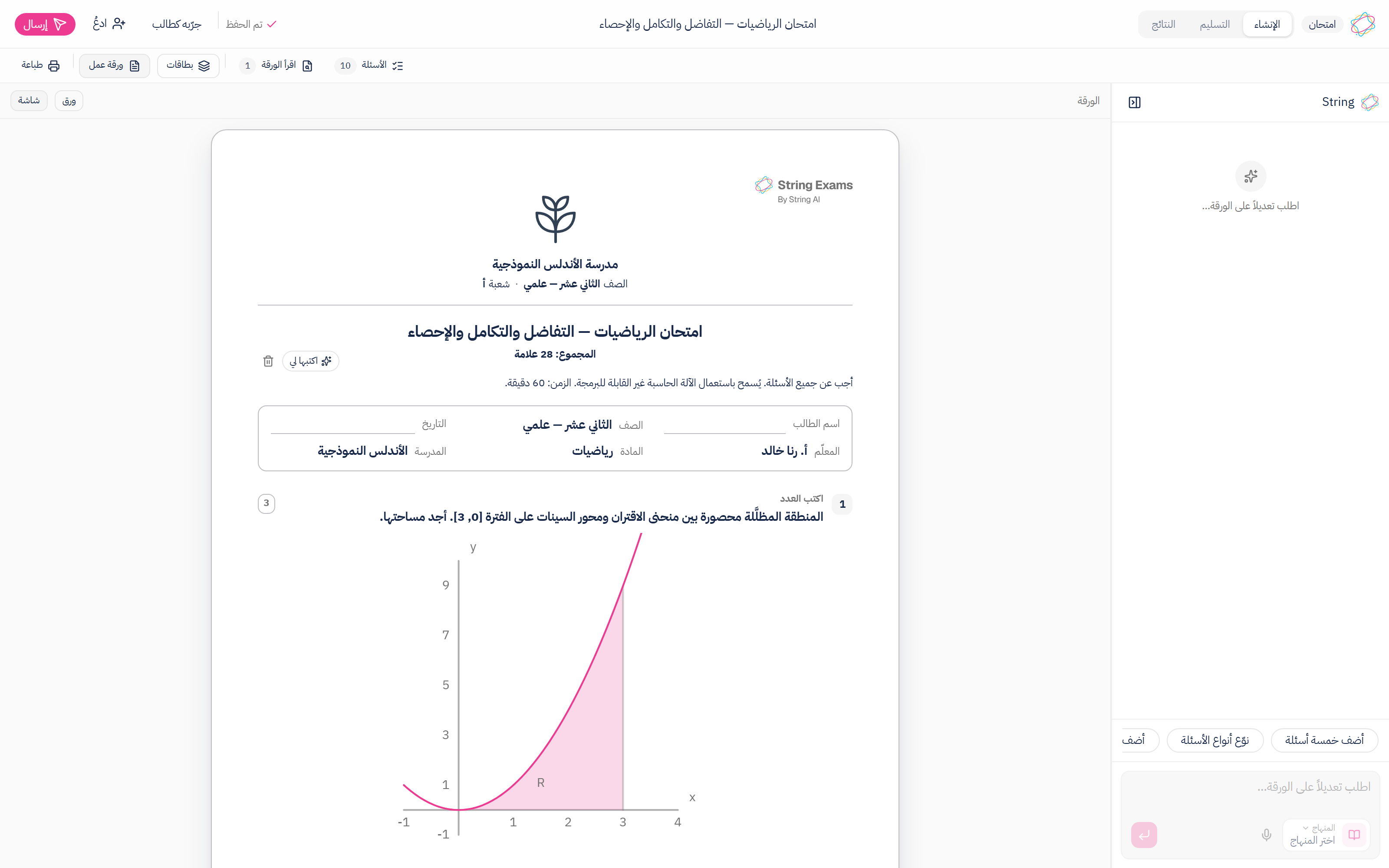
A sheet with a picture of a number line is a sheet with a picture. Here the figure is the question — as the shaded region is in the paper above.
The figure is the question, not a picture beside it
The curve in the question is not an image file dropped into it: it is what is asked, what is answered on and what is marked. Its values, its labels and its range are edited the way the question's text is edited, on the paper itself.
Seven ways to answer on a figure
Typing a value into a box on an axis, tapping a point on a curve, tapping a region of the figure, dragging a label onto its place, plotting a point on the coordinate plane, shading parts of a partitioned shape, or drawing freehand.
The marking is written with the question
Six of the seven mark themselves the moment a student finishes, because every figure carries its accepted values and their tolerance written inside the question. The seventh is freehand drawing, which has no machine answer and never claimed one.
169 authored figures on 13 drawing engines
Number lines, fraction bars, function graphs, vectors, solids and their nets, frequency charts, probability trees, Venn diagrams and measuring instruments. You pick one and set its numbers rather than drawing it from scratch or hunting for it in an image library.
Drawn inside the paper, so it prints as you see it
Every interactive figure has a print rendering of its own rather than a photograph of the screen one, so it is never cropped at the margin, never washed out, and never parts company with its question when the paper is broken into pages.
The answer does not print on the student's copy
A figure that measures an angle does not print the measurement, and a solid whose volume is the question does not print its volume. The mark scheme lives with the question and is switched off on the paper in the student's hands.
What one paper can hold
Up to 120 questions in one document. A real three-hour national paper is 40.
Question types you start from
- Multiple choice
- Choose all that apply
- Short answer
- Long answer
- A numeric answer with a tolerance
- A multi-part question: a, b, c
- Fill in the blank
- Put steps in order
- Match pairs
- Sort into groups
- Complete the table
- Answer on the figure
- A passage to read before a group of questions
What a student does to a figure
- Types a value into a box on the figure
- Taps a point on a scale or a curve
- Taps a region of the figure
- Drags a label onto its place
- Plots a point on the coordinate plane
- Shades parts of a partitioned shape
- Draws freehand — the one that waits for your eye
What prints around the questions
- A masthead with the school's name and crest
- Grade, section, date, the student's name, the teacher's name and the subject
- The total and the time, directly under the title
- A mark on every question and on every part of it
- Written instructions above the questions
- Ruled working space at the depth you choose
- Page breaks you place yourself
- Up to 4 blank pages for rough work
From a topic to a printed stack
- 1
Say what the paper is on
The grade, the subject, the topic, how many questions. Nothing to upload and nothing to paste.
- 2
Read the suggestions before they land
What String proposes waits in a list beside the paper and joins it only when you say so. Keep them all, discard them all, or one at a time.
- 3
Edit on the paper, not in a form
Click the question and type over it, drag to reorder, add a figure, edit the masthead where it prints. The preview is the paper.
- 4
Read the paper before your class does
Before you print, the paper is read back to you: one question carrying a quarter of the marks on its own, too many marks resting on hand marking, marks a student could reach by guessing, one option letter keyed more often than chance allows.
- 5
Print it, or make forms A and B
Up to 4 named forms of one paper. You choose the anchor questions, which appear in every form and in the same position — that is what keeps the forms comparable — and the rest rotate.
What the machine will not mark, said before you ask
Every closed question marks itself the moment it is answered: every choice, every number, every ordering, every match, and six of the seven ways to answer on a figure. Three do not, and never claimed to. A long written answer is scored on keywords, which is a note for you rather than a final mark. A freehand drawing has no machine answer at all. A table whose cells are all open has nothing to compare. The paper tells you which is which before you print it, so you know the size of marking night on Tuesday instead of on Thursday.
Common questions
Read next
Worksheets, quizzes and assignments
Three short formats for any lesson, ready to print
They differ in length and purpose, not in effort: name the lesson and print.
Reports
See who understood and who slipped, before the next lesson
One paper is enough: a map of the class skill by skill, the wrong idea your students share, and a written report for every one of them.
Build a paper now
Pick the lesson and how many questions, read the paper back, then print.