An operating system for education that learns about you to teach you
String brings all of your school's systems into one place, and AI agents run them.
Prepare this week's report, and tell me if any class needs me.
Done. I pulled data from three apps and worked in two:
Moodle·Read this term's marks for every Grade 7 class.
ReadGoogle Classroom·Read this week's homework hand-in rates.
ReadAttendance·Checked the week's attendance: 94.2% on average.
ReadReports·Wrote the weekly report, flagging 7A's drop in fractions.
ActionGoogle Drive·Saved the report to the leadership folder.
Action- Messages·Drafted a note to 7A's math teacher suggesting a support class.“I suggest a fractions support class on Tuesday for eight students…”Edit
Last five quizzes
- Attendance 94.2%, up 1.3 on last week.
- 12 of 14 exams marked.
- Grade 7A needs support in fractions.
2 pages · PDF
String in the background
- Drafted 18 absence notes for today's parents.Needs you
- Syncing first-term marks.Working
- Marking 27 physics papers for Grade 11.Working
- Arranged a cover lesson for Grade 9B.Done
Nothing is sent without your approval
Sample data
- Your curriculum, ready with no upload
- AI manages your students
- Exams and reports, ready
- Hundreds of apps for free
- Educational games for every textbook
Partners already working with String
Schools and education organisations that chose String.
I've used over 200 tools for teaching and administration across more than 50 schools. This is the first one that delivers value this directly, and this fast.
- Al Ramz Schools
- Al Khader Schools
- Kafou Academy
- Career Lab
- Siraj Academy
- Al Ummah International Schools
- Al Hussein Technical University
- STEAM Center Academy
- Tariq Bin Ziad Schools (Qatar Foundation)
Everything a school runs, in one system
Classes, lessons, exams and apps work together, so nobody moves data between systems by hand.
Every class in one Space
Chat, gradebook, attendance and calendar are created with the class itself.
The worksheet is ready before class
Studio makes worksheets, exams and slide decks from your lesson.
One lesson built from many apps
A video, then a 3D model, then a quiz. The student sees one experience.
Your curriculum is here before you are
Grades, subjects and units are already in place, so there is no book to upload.
Four layers under every class
Each layer reads from the one below it. That is how String knows what happens across the whole school.
Your school's apps work inside String
The apps your school already uses run inside String under one account.
- Hundreds of apps for free
- Educational games for every textbook
One AI that works across all your apps
String reaches the apps your school uses, runs them, and works inside them, even the ones with no AI of their own.
It reaches every app
No more moving between apps. Ask String for what you need, and it reaches every app your school uses.
It runs the apps for you
Ask in one sentence, and String carries out the steps in each app for you.
It works inside the app itself
String adds its assistant inside the app, even one with no AI of its own, so students can ask it and teachers can lean on it.
Agents do the work. You make the call.
Agents work inside your school's systems. Nothing reaches parents before you approve it, and every step is logged.
Ready-made agents for school work
From paper to report, no chasing
Nothing is sent without your approval
The whole school, in front of the principal
A daily picture of attendance, learning and the classes that need attention.
The school at a glance
Attendance, grades and alerts on one screen every morning.
An attendance heatmap
See the days and periods where absences cluster, not just a list of names.
A flag before a student slips
String notices the patterns that come before a drop, and tells the counsellor.
Reports ready for the board
Term reports are built from the same data, with no manual collection.
Teachers teach. The rest gets done.
The work that used to take teachers' evenings now gets done inside String.
Ask for an exam like you'd ask a colleague
String writes the questions from your curriculum, and you edit them with a sentence.
Grades enter the gradebook on their own
Work students do inside String is marked and recorded with no data entry.
Your colleagues on the same paper
Share an exam with your department so they can review it before it is printed.
From the exam paper to the report
Exams in the format your school uses, and results you can read question by question.
The exam in its official format
The school header, mark scheme and answer key on one paper.
Results, question by question
A map of the questions the class stumbled on.
Ask about the results
Ask the agent in your own words, and it answers from the exam's own data.
A report for every class
Averages and the spread of marks, ready to print.
The hardest questions come first
The report orders questions from hardest for the class to easiest.
Results reach parents
Once you approve, each parent sees their own child's result only.
Compare sections
Put the sections of one grade side by side.
String understands every student
Three reads on every student, updated with everything they do inside String.
How they think
A profile of how the student learns and what makes them try.
What they know
A skill map that tracks mastery of each concept in the curriculum.
How they show up
Attendance and lateness patterns are read alongside grades, not apart from them.
Parents informed, students learning by play
Parents get what they need each evening, and students move through their curriculum like a game.
Messages without phone numbers
Parents talk to teachers inside String without sharing personal numbers.
Absences reach parents on their own
When a student is marked absent, the parent is notified straight away.
A summary every evening
A short summary of what the child learned and needs, in words every parent understands.
A game for every textbook
Students move through their textbook's units in challenges that adapt to their level.
The family app is free, and connected to all of your school's apps
Parents see their children's whole school day in it: attendance, forms, messaging teachers, grades, and the teacher's daily note.
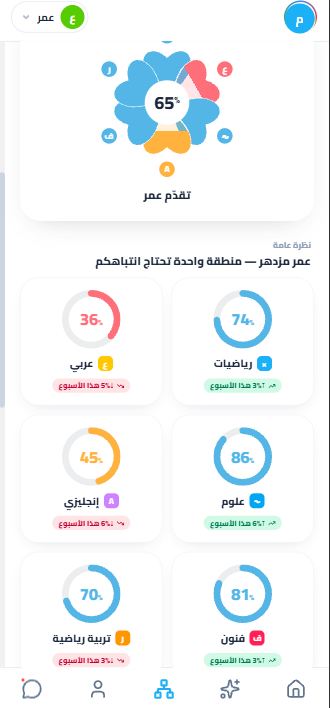
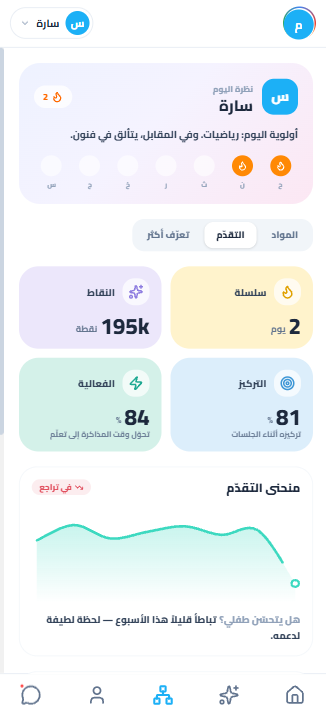
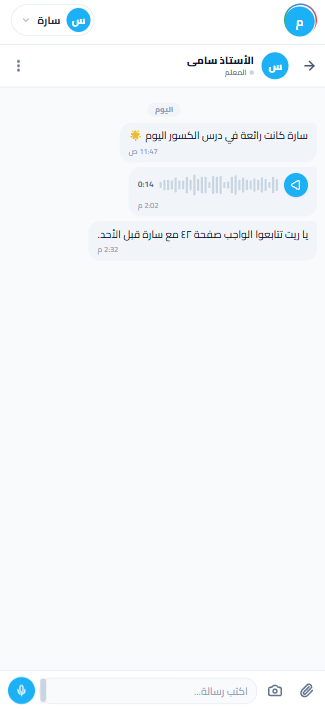
What parents see in the app
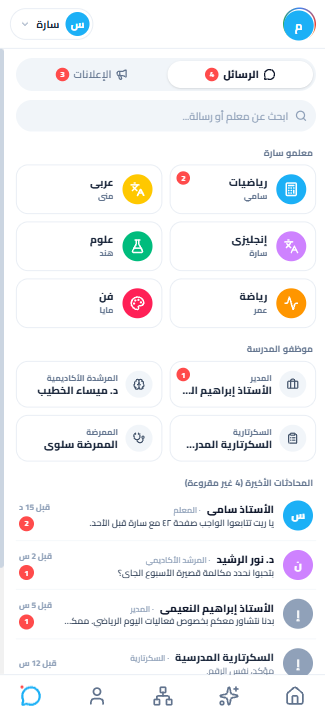
Everyone who teaches your child, in one list
Six teachers by name and subject, the principal, the academic counsellor, the nurse and the school office. You write to them, or send a voice note, and you see when it was read. No phone numbers, and no WhatsApp group with forty parents in it.
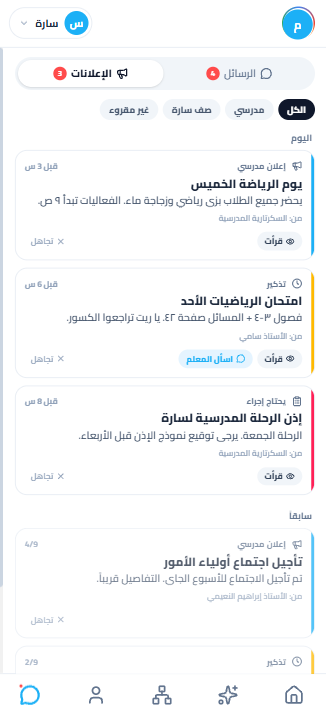
School announcements
The school's announcements on one side, your child's class on the other. Anything that needs something from you arrives marked, so it doesn't disappear into the rest.
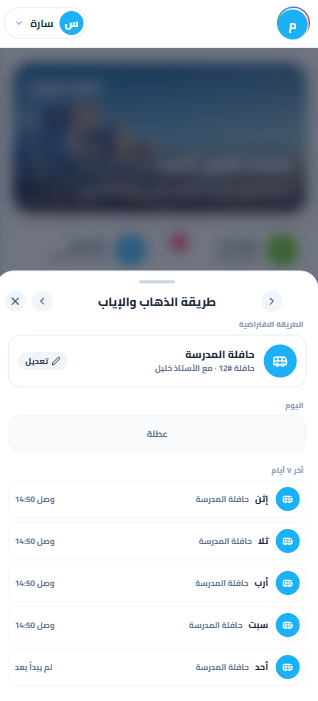
The way there and back
And everything a school needs daily
Every school system inside String, sharing the same data.
Attendance
By code, by link or by hand, from one screen for the whole class.
Gradebook
Most cells are filled before you open it. You review them.
Chat
A chat for every class, and parent broadcasts that arrive one by one.
Video meetings
A video room for every class that takes attendance on its own.
Calendar
A calendar for each class, and one for the school that holds them all.
Interactive textbooks
Students ask their textbook, and it answers only from the approved curriculum.
The family app
Attendance, grades, messages and absence requests in one app.
User management
Teachers, students, parents and their permissions from one place.
Everyone gets in easily, from anywhere
One account for every app, on phones and computers, in Arabic and English.
One sign-in for every app
Teachers and students sign in once, and every school app opens.
Learning continues at home
Students reach their lessons and homework from home, just as in class.
In Arabic and in English
Interface, content and reports in both directions, right to left and left to right.
Every role, its own screen
Teachers on a laptop, students on a tablet, parents on a phone. The data is the same.
Parents, in their pocket
Attendance, grades and messages on the phone.
Teachers, at their desk
Studio, marking and reports on the computer.
Students, in class
Lessons and challenges on the tablet.
Encrypted data
Data is encrypted in transit with TLS and at rest with AES-256.
We never sell student data
And we never use it to train public AI models.
Deleted when the contract ends
Student data is deleted or de-identified within 60 days of the contract ending, or whenever the school asks.
From the people who run schools
Three leaders who replaced their stack with String — in their numbers, not our words.
How your school starts
Four steps from creating the account to the first report on the principal's desk.
- 01
Create the school's account
The first year is free, with nothing to install.
- 02
Invite teachers with a link
The link goes out by email or WhatsApp, and teachers join with no setup.
- 03
Classes and their curriculum appear
Classes are built from student lists, and each one is linked to its curriculum.
- 04
The first report arrives
After the first exam, a report shows where each class needs help.
Why schools choose String
What a principal asks before deciding.
The first year is free
Your school starts with a full year at no cost, and after it String OS is paid. String Studio, the family app and the AI in them stay free.
Nothing to install
It runs in the browser on computers, tablets and phones.
Arabic and English
A full interface in both languages, each in its own direction.
Your curriculum, ready
No books to upload, and no question bank to build from scratch.
Your apps stay
The apps your school relies on keep working inside String.
Permissions for every role
Everyone sees what is theirs: teachers their classes, parents their child.
AI inside the work
No separate tool to learn. Agents work inside the screens you already use.
And everything that comes next
Every new feature reaches your school inside the same subscription, with no upgrade to buy.
Questions principals ask
What a principal asks before deciding.
Your school starts with a full year at no cost, and after it String OS is paid. String Studio, the family app and the AI in them stay free.
No. It runs in the browser on computers, tablets and phones.
No. Grades, subjects and units are already in place, so there is no book to upload.
No. The apps your school relies on keep working inside String.
No. We never sell student data, and we never use it to train public AI models.
Student data is deleted or de-identified within 60 days of the contract ending, or whenever the school asks.
Yes. A full interface in both languages, each in its own direction.