Twenty Arabic prompts for lesson prep, each with blanks to fill
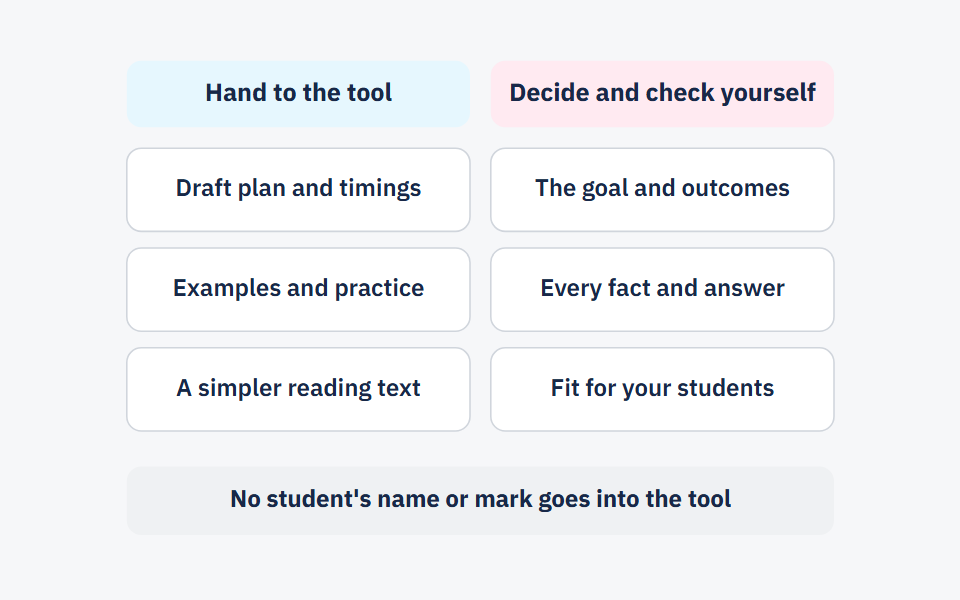
Copy the prompt, fill in what is between the square brackets, then check the answer with the check written under it: facts, level, curriculum fit, bias, or student data. Twenty prompts in six groups, and not one of them needs a student's name or mark.
Twenty prompts for lesson prep — short form
A free printable PDF, no sign-up.
- Definition
- Prompt: The instructions you write to an AI tool to get the text you want from it.
In a Gallup and Walton Family Foundation survey published on 14 October 2026, 59% of 1,952 US K-12 educators said they used AI tools in the 2025–26 school year, for work including preparing to teach, making student learning materials or assessments, grading, giving feedback and administrative tasks. We know of no comparable figure for Arab teachers. The twenty prompts here were written in Arabic from the start, for a class in an Arab school and its curriculum; the English versions below are their twins. Each one asks for a single part of the preparation.
How to use the templates: four parts and one check
Every prompt here has four parts: the task, the class and subject, the limits, and the format of the answer. What sits between square brackets [ ] is an example; swap in what fits your lesson. We suggest asking for one part at a time, because a short answer is quicker to check than a whole lesson in one reply. Under each prompt is the most important check for its answer, from these five:
| Check | What you ask of the answer |
|---|---|
| Facts | Is every definition, number and date right? Did you solve every problem yourself, and does your answer match the one given? |
| Level | Are the words, the sentences and the length of the task right for your class? |
| Curriculum fit | Are the terms, the method and the order of lessons the ones in your textbook, with nothing ahead of what students have learned? |
| Bias | Are the names, roles and examples varied and drawn from your students' lives, without painting one group of people one way? |
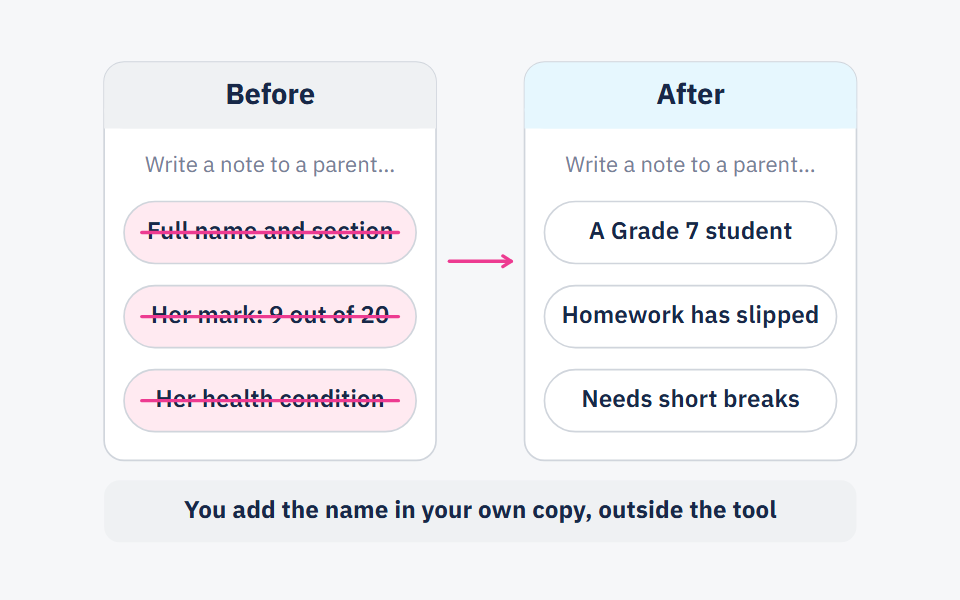
| Student data | Is the prompt free of any student's name, mark, and anything else that identifies them? |
The check under a prompt is its most important one, not its only one: the facts check applies to every answer with a fact or a problem in it. The TeachAI toolkit lists among the risks of AI in education perpetuating societal bias, and compromised student privacy and unauthorized data collection, which is why those two checks are among the five.
Planning: four prompts before you write the plan
1. Two goals from one outcome: “Turn the learning outcome below into two goals for one [45]-minute lesson, each starting with a verb that shows in a student's work, such as calculate, compare, write. Class: [Grade 6]. Subject: [science]. Outcome: [copy it word for word from the teacher's guide].”
Check — curriculum fit: do the two goals stay inside the outcome, or add something it does not ask for?
2. Spreading a unit over lessons: “I have [8] lessons of [45] minutes each to teach a unit on [decimals] to [Grade 5]. These are the unit's lessons in textbook order: [list of lessons]. Spread them over the lessons, with one lesson for review and one for assessment, and give the result as a table: lesson number, topic, goal.”
Check — curriculum fit: is the order your textbook's order, and are there exactly [8] lessons in the table?
3. What students need first: “What prior skills does a [Grade 7] student need in order to learn [solving two-step equations]? Name three, and for each write a short question I can ask at the start of the lesson to see who has it.”
Check — level: can a student answer each question in under a minute, and is it at the level of what they have actually learned?
4. An opening from students' lives: “Suggest three openings for a lesson on [air pressure] for [Grade 8], each [3] minutes long. Each starts with a situation familiar to a student living in [Amman] and ends with a question that leads into the lesson.”
Check — bias: is the situation one your students actually live, or one from another country, or from the life of only one group of them?
Explaining: four prompts for what you say in the lesson
5. Three ways to explain: “Explain [decimals] to [Grade 4] students three ways, a short paragraph each: in simple sentences, then with an example from [the market], then as a picture I can draw on the board. Use these terms exactly and add no others: [terms as in the textbook].”
Check — facts: is every sentence still correct once simplified?
6. An analogy and its limits: “Suggest two analogies for explaining [electric current] to [Grade 9] students, and for each say where it does not match the concept, so students don't take a wrong idea from it.”
Check — facts: is what was written about each analogy's limits right? An analogy whose limits you don't know yourself is one not to use.
7. Thinking aloud: “I will solve this example in front of the class: [example]. Write what I say as I solve it, in numbered steps, with the question I ask myself before each step, such as: What is being asked? What do I know?”
Check — facts: solve the example yourself first, then compare each step with yours.
8. The hard words in a text: “Pick out [eight] words in the text below that a [Grade 6] student might not know. For each, give its meaning in this text and a new sentence that uses it the same way. Text: [paste the text].”
Check — level: are the chosen words really hard for your students, and are the new sentences easier than the text, not harder?
Practice: three prompts for what students do
9. Graded problems: “Write [ten] problems on [percentages] for [Grade 7], from easiest to hardest, with numbers that need no calculator, and with names and places from [Jordan]. Put the answers in a separate list at the end.”
Check — facts: solve every problem yourself; the tool can write a wrong answer and present it as right.
10. Working with one mistake: “Write worked steps for the problem below containing one mistake students commonly make, without pointing it out in the working. Then on a separate line say where the mistake is and why students make it. Problem: [problem].”
Check — facts: make sure there is exactly one mistake, and every other step is right.
11. Discussion questions: “Write [six] discussion questions on [evaporation] for [Grade 5], each with more than one defensible answer, none answerable in one word.”
Check — level: can your students talk about each question for two minutes with what they know? How to run them in class is in think, pair, share: the strategy step by step.
Assessment: three prompts for questions that tell you what they understood
12. Multiple choice with diagnostic options: “Write [five] multiple-choice questions on [adding fractions] for [Grade 6], with four options each. Make every wrong option the result of one specific common mistake, and after each question name the mistake behind each option.”
Check — facts: does every question have exactly one right answer?
13. A rubric: “Write a four-level rubric for [writing a persuasive paragraph] for [Grade 9], with three criteria: [criteria]. Describe each level by what shows in the student's work, not with words like ‘good’ and ‘excellent’.”
Check — curriculum fit: do the criteria measure what the outcome asks for, not what is easy to measure? The rubric guide shows how to write one from scratch.
14. Reviewing a quiz you wrote: “Here is a short quiz I wrote: [paste the questions]. Here are the lesson's goals: [goals]. For each question, say which goal it measures, flag any question that could be read more than one way, and suggest a clearer wording.”
Check — curriculum fit: every decision is yours; the tool doesn't know what you taught in class.
Differentiation: three prompts for a class with many levels
15. One text at three levels: “Rewrite the text below at three levels for [Grade 5] students: a simpler level with short sentences, the grade level, and a higher level followed by thinking questions. Keep the same information at all three levels. Text: [paste the text].”
Check — facts: compare the simplest level with the original: was any information dropped, or any meaning changed?
16. A help card for one step: “Some [Grade 6] students get stuck on [finding a common denominator]. Write a five-line help card: a short worked example, then two questions the student solves alone.”
Check — student data: describe the step they get stuck on, not the students; no name and no mark in the prompt.
17. A task for early finishers: “Write one extension task for students who finish practice early in a lesson on [area] for [Grade 6]. It should take about [10] minutes and ask for deeper thinking, not more problems of the same kind.”
Check — level: is it actually harder, or only longer?
Communication: three prompts for what goes home
18. A note to parents about a new unit: “Write a short message to the parents of [Grade 4] students about the unit on [measurement] we start next week: what students will learn, and one activity parents can do at home in ten minutes. Plain language, under [120] words.”
Check — bias: does the activity assume equipment, time or schooling that not every family has?
19. A report card comment with no name: “Write three versions of a report card comment for a student who [takes part a lot in class but hands homework in late]. Start with what they do well, then give one specific step for next term. Use no name.”
Check — student data: add the name and any personal detail in your own copy, outside the tool.
20. Project instructions: “Write one page of instructions for a project on [a model of the solar system] for [Grade 6]: what is required, the due date [date], how it will be assessed in three points, and what is not required. In short sentences a student can follow without my explaining.”
Check — level: read it as a student who missed the lesson: would they know what to do?
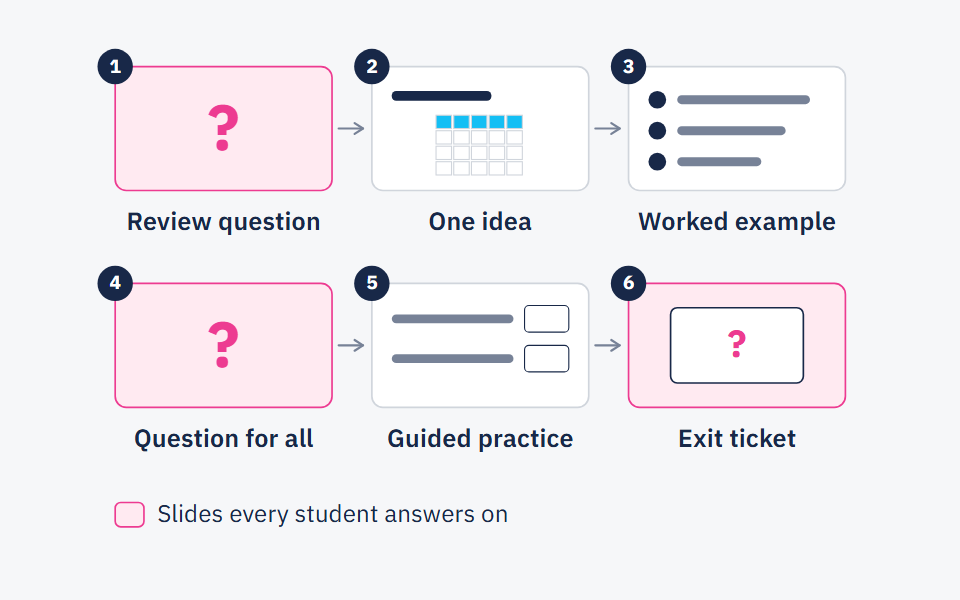
If what you are preparing is a slide deck, a lesson presentation with AI sets out the order of requests from outline to slides. For the full picture of what to hand to the tool and what to check yourself, read lesson prep with AI.
When not to use a prompt
- When you can't check the answer: if the topic is one you don't know well, a draft you can't check takes longer than writing it yourself from the textbook.
- For anything about one particular student: no name, no mark, no health condition, no family circumstance in any prompt. UNESCO's page on its guidance for generative AI in education (September 2023) notes that the absence of national regulations on these tools in most countries leaves users' data privacy unprotected. What to write instead of the name is in student data in seven rules.
- For judging a student's work: the tool can suggest the wording of a comment; it doesn't decide a mark. Marking and judgement are yours.
- For what students use themselves: the same guidance, as reported by UN News (September 2023), calls on educational institutions to validate AI systems for student use. These prompts are for you, in your preparation; whether students use these tools is your school's decision.
Frequently asked questions
- What is an AI prompt for teachers?
- The instructions you write to an AI tool to get the text you want. A good one names the task, the class, the limits and the format of the answer.
- Should I write the prompt in Arabic or English?
- Write it in the language you want the answer in, and ask for formal Arabic outright if that is what you need. Then check the spelling, the hamza and the terms against your textbook.
- What are the best ChatGPT prompts for teachers?
- No single prompt is best. A good one asks for one part of the preparation and names the task, the class, the limits and the format. The twenty templates here are written that way, and you can try them in any chat tool that writes text, ChatGPT included.
- Are the twenty prompts available as a PDF?
- Yes, at the top of this page: all twenty in short form on one printable page, each with its check, no sign-up.
Sources
Every fact in this post that we did not produce ourselves comes from one of these sources.
- Teachers Using AI Say It Frees Up Time for What Matters Most (Megan Brenan) — Gallup (with the Walton Family Foundation), 2026-10-14
- AI Guidance for Schools Toolkit — TeachAI, first released 2023, updated 2025
- Guidance for generative AI in education and research — UNESCO, 2023-09-07 (last updated 2026-01-16)
- UNESCO calls for regulations on AI use in schools — UN News, 2023-09-07
Written with String's editorial team: we use AI for research and first drafts, and a person checks every fact and every source before anything is published. How we write
Founder and CEO, String
“I grew up in a house of teachers.” I spent a year designing the STEM program for one of the largest school groups in Saudi Arabia, have written curriculum by hand, trained robotics coaches and sold software into schools, then left that job to build String in Amman.