School AI policy template to edit and adopt, with examples
A policy on AI that you can edit and adopt as your school's own, with rules for each stage and examples from different subjects, plus a letter to parents you can copy and send.
School AI policy
A free printable PDF, no sign-up.
- Definition
- School AI policy: A school AI policy is a short document the school's leadership adopts to set what teachers, administrative staff and students may and may not do with generative AI tools, and who oversees and reviews it.
The ten clauses, and how to fill them in
Copy the ten clauses onto school paper, then change anything in square brackets and any rule that doesn't fit your school. Don't start at clause 1. Put a name in clause 10 first, so someone's responsible for the rest, and then write the red lines in clause 4, which are what staff and parents look for. The stage table and the tool list come next.
1. Purpose and scope
[School name] allows AI tools where they help students learn and save staff time on routine work. This policy covers teachers, administrative staff and students, at school and in homework. It sits within the school's existing policies, including its conduct and academic integrity rules, and the law of [country], and does not replace them. [Name any official guidance on AI here. It takes precedence.]
2. What staff may do
Staff may use AI to draft worksheets, simplify a text for a class and draft letters. The teacher or sender reviews everything before it reaches a student or a parent. Any task involving student data uses an approved tool.
3. What students may do, by stage
Students use AI as the table below allows. The school sets the grades in each band, and a teacher may set a tighter rule for any task. Students also keep to the minimum age each tool sets in its terms of use.
| Stage | Allowed | Condition |
|---|---|---|
| Younger students [grades] | An activity the teacher leads, on an approved tool | No chatting with the tool alone, no personal account |
| Middle grades [grades] | Research, ideas, explaining a concept, revising for a test | Teacher's permission per task; the tool's own age rule; a line saying it was used |
| Last two grades | All of that, plus feedback on their own draft | The final text stays the student's; a note on use attached |
4. Never allowed
- Handing in work made by AI as your own.
- Using AI in an exam or test, unless its instructions allow it.
- Entering student data into a tool that is not approved.
- Letting AI decide anything about a student without a person.
- Using AI to pretend to be someone else.
5. Approved tools and data
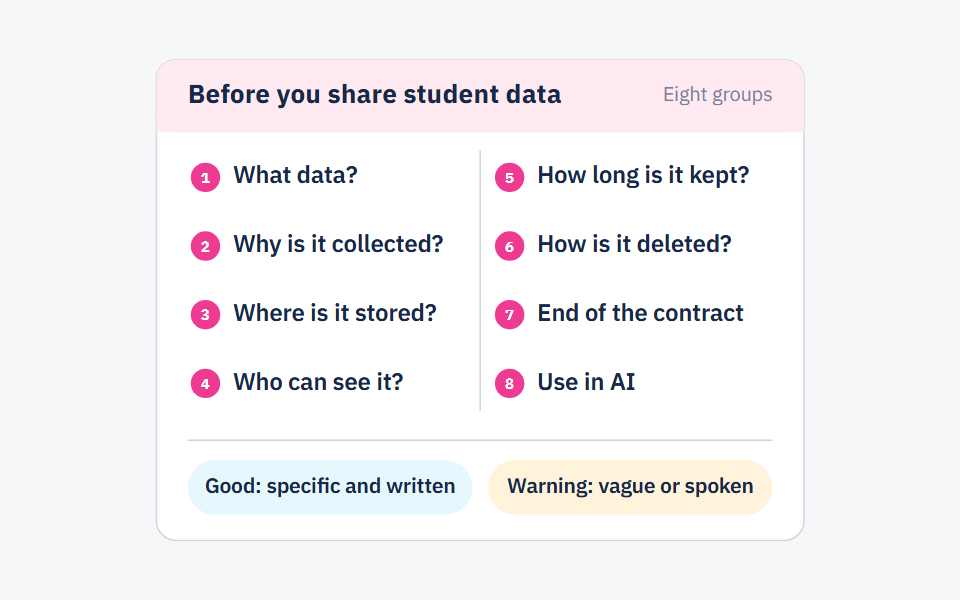
[Name, role] keeps the list of approved tools. A tool is added only after its provider has answered the school's data questions in writing.
6. Disclosure
A student who used AI on a task adds a line at the end naming the tool and what it was used for. Teachers tell parents when material sent home was made with AI.
7. Checking outputs
Anyone using an AI tool checks its output for accuracy before relying on it or passing it on.
8. Training and awareness
Staff attend a session on this policy before it takes effect. Teachers explain it to students through real tasks in their subject, and parents receive a letter with the policy attached.
9. Breaches and responses
Report a suspected breach to [name, role]. The school handles it under its existing conduct policy.
10. Owner and review
Owner, [name, role]. In force from [date]. The policy is reviewed at the end of each school year, and sooner when the school adopts a new tool or new official guidance appears.
Clause 5 does the most work, in our view, because the list isn't finished until the providers' answers arrive in writing. Before a tool goes on it, send its provider the questions in our post on sharing student data. UNESCO's guidance stresses that schools need to validate AI systems before students use them, as UN News reported. That goes for String OS too, if you're weighing us up.
How to set what students may do at each stage
Clause 3 is the one your staff will argue about. Its table has three bands, and you decide which grades go in each. We didn't take the lines from any source, so move them until they fit.
So where does the lowest line go? UNESCO's guidance on generative AI, last updated in January 2026, proposes “setting an age limit for the independent conversations with GenAI platforms” but gives no number on that page. The 13 you may have heard is from UN News, which reported UNESCO was “considering an age limit of 13 for their use in the classroom.”
That's why we kept younger students off independent chat in the table, using AI only in activities the teacher leads, and made the middle grades ask permission for each task. Each tool also sets a minimum age in its terms of use. Check it for every tool on your list, and when it's higher than your table, the tool's rule wins. If your ministry has set an age, that comes before both.
How to write the rule on a task, with examples from several subjects
A rule is easier to apply when it's written for a task the teacher sets, so swap the tasks we've used for ones from your own timetable. Each row says what the student or teacher still does without the tool, which is the part we'd want a teacher to be able to check.
| Subject or role | Allowed task | Rule written | Not allowed |
|---|---|---|---|
| Maths | Ask for a worked example of a type of problem, then solve a new one alone | The student shows their own working in class | Handing in an answer AI wrote; using AI in a test |
| Arabic | Feedback on a draft the student wrote | The student writes the final text and notes what changed | An essay written by AI handed in as their own |
| Science | Explain a concept, suggest questions for a lab | The teacher checks the facts against the textbook | Data made by AI presented as measured |
| Teacher, lesson prep | Draft a worksheet | Reviewed before use; no student names in the prompt | Pasting names or grades into a tool that isn't approved |
| Admin, letters | Draft a letter to parents | The sender reads it and owns it | Sending it unreviewed |
How to match the policy to what your ministry has published
Find what your ministry, directorate or the body that oversees your school has published, name it in clause 1 as the text that comes first, and attach it to the policy. In October 2026 we looked for each country's rules. The table shows what we found and how much of it we read. Some of it is press reports of documents we haven't seen, so read the original before you cite it, and where we found nothing, that doesn't mean nothing exists.
| Where | What's published | How we know | What to write in your policy |
|---|---|---|---|
| UAE | The Ministry of Education's 2026 Safe and Responsible Use of Artificial Intelligence in Classrooms manual. Generative AI is banned for students under 13 or below Year 7, and in formal exams. No personal data about students, teachers or parents goes into AI systems | A Gulf News report, last updated 14 February 2026. We haven't read the manual | Name the manual in clause 1 and check your stage table against it |
| Sharjah | A framework from the Sharjah Private Education Authority. Students may use AI to research and explore ideas, but not to write answers or complete assignments for them. It asks for disclosure where appropriate and for checking what the tools produce | Khaleej Times, 21 October 2026. No official title or start date given | Clauses 6 and 7 already match it. Add its official title once you have it |
| Saudi Arabia | A guide to using AI in education from the Ministry of Education with SDAIA, for students, teachers and parents, in three parts | Okaz, 25 January 2025. We haven't read its rules | Name the guide in clause 1 and say its rules come first |
| Jordan | We found no Ministry of Education rules for schools on using AI | Two searches | Adopt it as the school's own, to be reviewed when the ministry issues instructions |
| Qatar, Oman, Egypt | We found no rules for students or teachers that we could open and read. Qatar has a strategy and curriculum plans reported in the press | Our searches | Attach your ministry's text if it has one |
| US, international schools and elsewhere | Your state, district, local authority or accreditor may have its own guidance | Ask them | Name it in clause 1, beside your acceptable use and academic integrity policies |
If nothing's been published where you are, adopt it as the school's own rules, and clause 10 can say “This is the school's own policy. It will be reviewed when the Ministry of Education issues instructions on AI.” Neither the policy nor the parents' letter should say the ministry requires anything unless you've got the text in front of you.
If your school already has an acceptable use policy and an academic integrity policy, this one sits beside them. For an international school, or anyone who wants a general reference to check against, there are TeachAI's seven principles. Clauses 1, 4 and 10 rest on three of them, “Reaffirm adherence to existing policies,” “Maintain human decision-making when using AI” and “Regularly assess the impacts of AI.” TeachAI is led by Code.org, ETS, the International Society for Technology in Education, Khan Academy and the World Economic Forum, and the authors of its toolkit call their sample language a starting point for each school to adapt. That's how we'd like ours used too.
How to roll it out, staff first
Start with staff
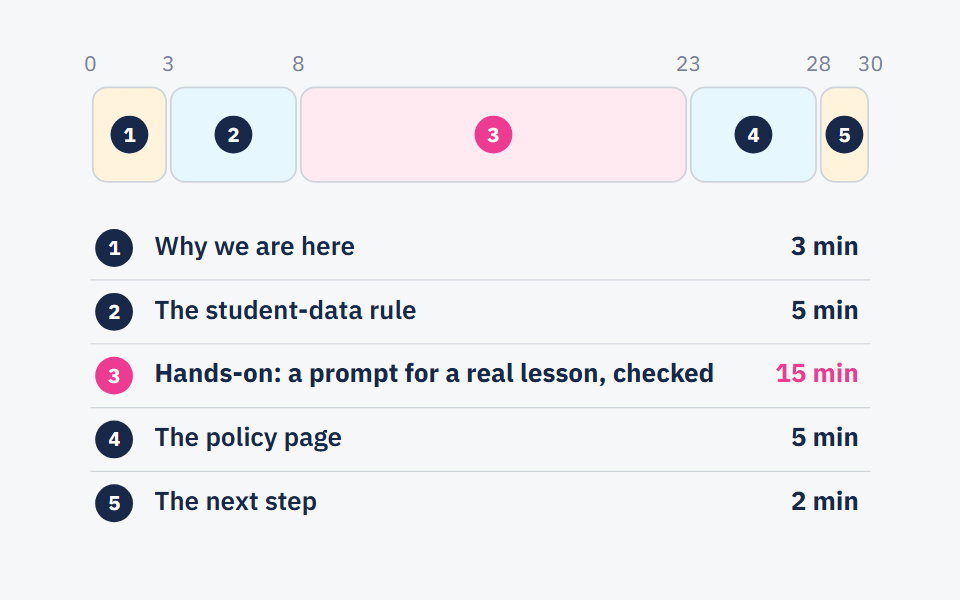
Run a short session before the policy takes effect, where teachers try the approved tools, and ask each of them to write a rule for a task they'll set next week, like the examples above. A 30-minute staff session on AI has an agenda you can use as it is.
Then students, in class
Each teacher goes through the rules with their own class, on a task they're about to set. A student gets what disclosure means the first time they write that line under work they're handing in, far more than from reading the clause.
Then parents
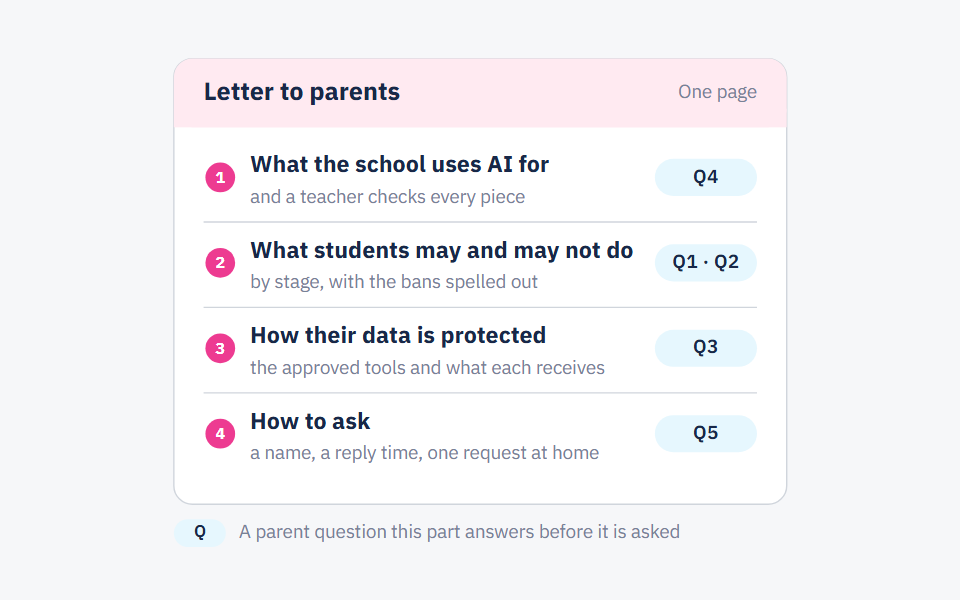
Once teachers can answer the questions, send the letter below with the policy attached.
Sign it and name the owner
The principal signs the letter. The owner named in clause 10 may be the principal, the academic director or someone they appoint, and takes the questions that follow and collects what needs changing before the review.
A letter to parents you can copy and send
Fill in the brackets, print it on the school's letterhead and attach the policy. For the questions parents ask afterwards, see what your school should tell parents about its use of AI.
Dear parents,
[School name] has adopted a policy on how students and staff use AI tools, the apps that write text or answer questions on request. You'll find it attached.
What students may do depends on their stage. Younger students use AI only in activities their teacher leads, on a tool the school has approved. From [grade], they may use it to research, explore ideas and revise, with their teacher's permission for each task, and they say which tool they used and what for.
At every age, work made by AI is never handed in as the student's own, and no one may put a student's personal details into a tool the school hasn't approved. The school approves a tool only once its provider has explained in writing how it keeps that data.
There are two things we'd ask of you. Please read the policy with your child, and encourage them to try their homework on their own first. If you have questions, contact [name, role] on [phone or email].
[Principal's name], Principal
Three mistakes that leave a policy on paper, and how to avoid them
Nobody owns it
Leave clause 10 blank and the policy's out of date the first time a teacher brings in a new tool. Who adds it to the list? Who answers the parent who writes in about it? Put one person's name there, with the date it takes effect and the date it's next reviewed.
Parents hear before teachers do
Send the letter before the staff session and the first questions land on teachers who haven't read the policy. They'll answer differently, and parents compare notes. Hold the session and let teachers take their classes through the rules before the letter goes out. That's why we put staff first in the roll-out.
Expecting the page to stop copying
On its own, the policy won't stop a student who's set on copying. Tasks do more of that work when they ask for something a tool can't hand over, like working shown in class in maths or the note on what changed in an Arabic draft.
Frequently asked questions
- Can students use ChatGPT for schoolwork?
- It depends on where your school draws the lines in clause 3. The template we've written allows it in the middle grades, with the teacher's permission for each task and a line saying it was used. Gulf News reports that the UAE bans it for students under 13 or below Year 7, and every tool sets its own minimum age, so check its terms.
- Does a school need a written AI policy?
- Without one, each teacher sets the rules for their own class, and they won't all match. Writing them down gives staff, students and parents a single set to read. Don't call it a ministry requirement unless you can cite the text.
- Should we adopt a policy before the ministry issues guidance?
- Yes, as the school's own rule. Say in clause 10 that it'll be reviewed when official guidance arrives, and don't write “the ministry requires” anywhere unless you've got the text.
- How often should a school AI policy be reviewed?
- At the end of each school year, and sooner when the school adopts a new tool or new official guidance appears. TeachAI's principles put it as “Regularly assess the impacts of AI.” At the review, the owner changes the clauses that drew the most questions from teachers and parents during the year.
- What should the policy say about student data?
- Only approved tools get student data, and a tool is approved once its provider has answered your questions in writing. You can send the ones in our post on student data as they are. In the UAE, Gulf News reports a ban on putting any personal data about students, teachers or parents into AI systems, so a school there should build clause 5 around it.
Sources
Every fact in this post that we did not produce ourselves comes from one of these sources.
- Guidance for generative AI in education and research — UNESCO, 2023-09-07 (page updated 2026-01-16)
- UNESCO calls for regulation of AI in schools (UNESCO guidance on generative AI in education) — UN News, 2023-09-07
- AI Guidance for Schools Toolkit — TeachAI, 2025 (first released 2023, updated 2025)
- Principles for AI Guidance — TeachAI, 2025
- Sharjah schools introduce new AI rules: what changes for homework and exams — Khaleej Times, 2026-10-21
Written with String's editorial team: we use AI for research and first drafts, and a person checks every fact and every source before anything is published. How we write
Founder and CEO, String
“I grew up in a house of teachers.” I spent a year designing the STEM program for one of the largest school groups in Saudi Arabia, have written curriculum by hand, trained robotics coaches and sold software into schools, then left that job to build String in Amman.